Enhance Your Twitch and YouTube Chat Experience with BetterTTV
Chrome Extension
If you're a regular user of Twitch and YouTube, you may have noticed that the default chat settings lack features and customization options. But don't worry, we have the solution for you! Introducing BetterTTV, a powerful
Chrome extension
designed to enhance your chat experience on Twitch and YouTube.
Features that Take Your Chat Experience to the Next Level
BetterTTV brings a wide range of features to both Twitch and YouTube, ensuring that you have the ultimate chat experience. Let's take a look at some of its noteworthy features:
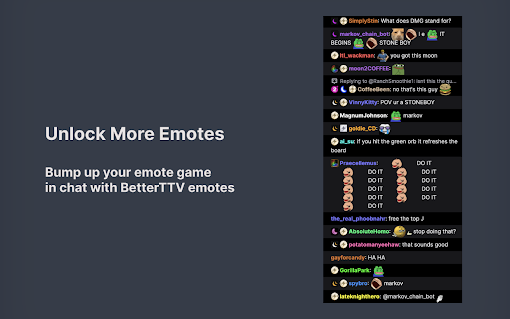
Extra Emotes in Chat: Access a vast collection of BetterTTV global and per-channel custom emotes, adding more fun and expression to your chat interactions.
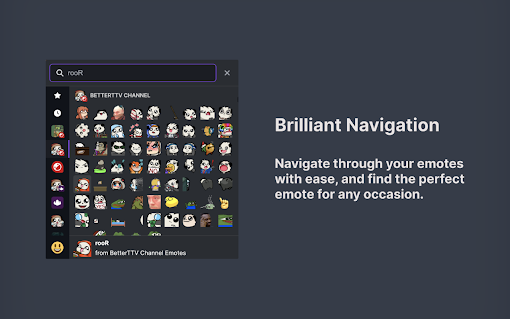
Improved Emote Menu: Enjoy a more user-friendly and enhanced emote menu, making it easier than ever to find and use your favorite emotes.
Custom Keywords: Take control of your chat experience by setting custom keywords that target specific phrases, words, users, and chat badges. This feature allows you to filter and personalize your chat content.
Split Chat Lines: Enhance readability with split chat lines, ensuring that you can follow conversations effortlessly, even in busy chat rooms.
Deleted Links and Messages: Ever wonder what was hidden or deleted in chat? BetterTTV allows you to see deleted links and messages, giving you a comprehensive view of the conversation.
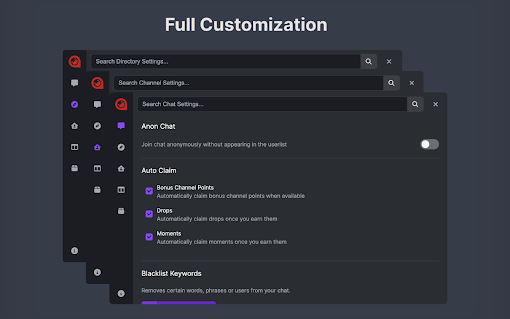
Anon Chat: Want to join a channel without showing up in the user list? BetterTTV has got you covered with its Anon Chat feature, offering you a discreet presence in the chat.
Automatic Claiming: Never miss out on channel points bonuses, drops, and special moments with BetterTTV's automatic claiming feature. Sit back and let the extension do the work for you.
Visual Noise and Clutter Removal: Say goodbye to visual noise and clutter in chat. BetterTTV allows you to hide recommended channels, bits, replies, notices, and community highlights, ensuring a clean and distraction-free chat experience.
How to Get Started with BetterTTV
Getting started with BetterTTV is effortless. Simply install the Chrome extension and visit Twitch or YouTube to unlock its powerful features. For YouTube, you may need to agree to additional permissions during installation. If you missed this step, don't worry! You can enable it anytime from the BetterTTV Settings.
Customize your settings according to your preferences by accessing the chat settings or clicking on the BetterTTV settings from the user dropdown menu. Please note that not all settings are currently compatible with YouTube, but the BetterTTV team is continuously working to improve compatibility.
Unlock the Full Potential of Your Chat Experience
With BetterTTV, you can elevate your Twitch and YouTube chat interactions to new heights. Join the community of satisfied users who rely on this Chrome extension to add more emotes, customize their chat settings, and enhance their overall experience.
Don't settle for the default chat options. Install BetterTTV today and unlock the full potential of your chat experience on Twitch and YouTube!
Remember, BetterTTV is here to enhance your chat experience - because when it comes to Twitch and YouTube, better is always better!
Adds extra emotes for more chat expression.
Improved emote menu for easy access.
Custom keywords for personalized chat experience.
Enhanced readability with split chat lines.
Ability to see deleted links and messages.
Not all settings are compatible with YouTube.
Limited compatibility for YouTube users.
4.64
10412 reviews
30 Reviews For This Extension
Reviewed by Moog • 38 years ago Updated 1 month ago - 2026-07-22 00:12:04
Selling subscriptions over another website is stupid!
Reviewed by Björn Lessmark - 2026-07-06 18:09:42
Okay addon that has somewhat outpllayed it's point. But now it has started spamming notifications for no discernible reason making it more of a headache than it is worth, so wouldn't recommend it.
Reviewed by Monorail Blindness - 2026-07-05 22:05:22
cringe dev
Reviewed by Adam - 2026-07-02 20:36:32
Authenticated users get the full review
Reviewed by AI Answers - 2026-07-01 19:44:12
Begining to paywall most features. Now nags you to authenticate (pay) for more features. Considering removing it. It's the enshittification stage.
Reviewed by Mattia “Chuck” Ortolan - 2026-06-23 22:51:54
It worked fine in the past, but now seems like it stopped auto-claiming Twitch drops. I always have to manually redeem them one by one.
Reviewed by Jennifer - 2026-06-22 21:17:01
I love BTTV but the emote menu button been disappearing on me for days. It's always been next to the chat button. I can get it back if I toggle the emote menu setting off and on but that auto enables the replace twitch native emote menu. If I toggle off the replace native twitch menu, I lose the BTTV emote button. This feels like a bug that needs to be fixed.
Reviewed by ່ - 2026-06-08 20:11:30
All settings was deleted by themself, about 100 blacklisted keywords and about 10 highlight keywords for no reason.
They baiting you to pay, do not trust them.
Reviewed by customer service BO5 41O 5OO3 Jeera - 2026-05-31 05:37:33
Enhance Twitch with custom emotes and smooth chat features
Reviewed by Vasily Kravtsov - 2026-05-27 15:52:41
Love the extension but pls fix it, right now it doesn't work (there's no emote menu button)
Reviewed by ti - 2025-04-03 21:03:57
used to be perfect but sudden changes like recommended channels not going away and adding a picture in picture button that nobody wanted makes it unusable.
Reviewed by Bryan - 2025-04-03 14:26:04
This was a 5 star extension, but yet again it's stopped blocking recommended channels/viewers also watched on Twitch, which is the entire reason I use it. Downgraded to 1 star
Reviewed by Maroš Štofaník - 2025-04-03 11:47:40
added unremovable pip button where theatre mode button used to be = deleted
Reviewed by UMPish - 2025-04-01 18:52:40
Recommended channels wont go away despite the option being turned off
Reviewed by lilmisskitten83 - 2025-03-31 18:04:54
Very buggy some emotes dont show up ive tried everything
Reviewed by Ethan - 2025-03-29 21:18:05
not working
Reviewed by DEX - 2025-03-29 16:11:34
Alt+E shortcut to popout emoji page not working rn in chrome cuz chrome shortcut popout beyond emoji page. hope you fix this.
+ shift to adding lots of emoji not working too. Seems like any keyboard not working in chrome.
Reviewed by Tom - 2025-03-28 03:38:04
doesnt seem to be automatically claiming drops right now even with the box ticked. autoplay on vids is still on despite being off
Reviewed by outback jack - 2025-02-15 05:23:18
BetterTTV is awesome I love it and i would recommend it for any streaming or if you're just a Viewer on twitch.tv
Reviewed by Suzanne L - 2025-02-03 15:46:11
nothing better than bttv, solid and safe, I trust it!!!
Reviewed by digglerdudeuk - 2024-10-05 20:44:55
Recent update affecting dark mode for the chat window - having to keep turning it back on every time I join a stream.
Reviewed by Denis Isaikin - 2024-09-29 19:02:12
Reveal Deleted Messages not working
Reviewed by Abdo Mokh - 2024-09-29 04:07:01
Chat message history up and down arrow not working
Reviewed by The Wizard Hidro Metalizacao - 2024-09-06 15:00:53
top D+
Reviewed by Austin - 2024-09-01 19:50:44
It doesn't really work on youtube. I can't use the emote I uploaded on a stream. The emote menu will open but when I try to scroll down it just switches back to youtubes one.
Reviewed by ef ef - 2024-07-15 13:48:13
confusing app. i can send bttv emotes but i have no overview of all the avaible emotes. the dashboard doesnt help either i have to add emotes first from others to use them? but that doesnt work either theres no button to add when i click on one. also the app does not work without you giving consent for the app to read the youtube domain which i dont like. for some emotes its not worth the hustle
Reviewed by Tekno - 2024-06-19 07:07:15
tab completion for emotes and global bttv not working. running Version 126.0.6478.115 (Official Build) (64-bit) and BTTV Version 7.6.5.
Reviewed by TT - 2024-06-14 21:45:21
does not show 7TV smiles
Reviewed by S - 2024-06-13 17:52:19
Trying to use the settings for BTTV in OBS tells me "Unsupported Chromium Version" Is there a way to update chrome on OBS? Got it working on my standalone chrome install, but not OBS.
Reviewed by AVP2 - 2024-06-06 06:00:21
After 7.6.3 update BTTV/7TV emotes dont work at all. Some emotes dont even showing and those who are showing dont work when i click on them. I try to disable and enable emotes in settings but still dont work.
Clearing my cookies/cache and uninstalling/reinstalling BTTV dont fix anything.
Good extension but 7.6.3 update is broken.
Manifest
The manifest file contains thorough security measures, significantly reducing potential risks to user privacy and system security. Note: A low risk score does not necessarily imply malicious intent
0
Content Script
The content scripts are well-designed with comprehensive security measures, minimizing the risk of exploitation and ensuring a secure browsing experience. Note: A low risk score does not imply malicious intent
0
Permissions
The permissions requested by the extension are excessive and raise significant concerns about user privacy and data security. Note: A high risk score does not necessarily mean the extension is malicious
10
Host Permissions
Host permissions are used sparingly and purposefully, with stringent controls to prevent abuse and protect user security. Note: A low risk score does not imply malicious intent
This site, like many others, uses small files called cookies to help us improve and customize your experience. Learn more about how we use cookies in our cookie policy.














30 Reviews For This Extension
Selling subscriptions over another website is stupid!
Okay addon that has somewhat outpllayed it's point. But now it has started spamming notifications for no discernible reason making it more of a headache than it is worth, so wouldn't recommend it.
cringe dev
Authenticated users get the full review
Begining to paywall most features. Now nags you to authenticate (pay) for more features. Considering removing it. It's the enshittification stage.
It worked fine in the past, but now seems like it stopped auto-claiming Twitch drops. I always have to manually redeem them one by one.
I love BTTV but the emote menu button been disappearing on me for days. It's always been next to the chat button. I can get it back if I toggle the emote menu setting off and on but that auto enables the replace twitch native emote menu. If I toggle off the replace native twitch menu, I lose the BTTV emote button. This feels like a bug that needs to be fixed.
All settings was deleted by themself, about 100 blacklisted keywords and about 10 highlight keywords for no reason. They baiting you to pay, do not trust them.
Enhance Twitch with custom emotes and smooth chat features
Love the extension but pls fix it, right now it doesn't work (there's no emote menu button)
used to be perfect but sudden changes like recommended channels not going away and adding a picture in picture button that nobody wanted makes it unusable.
This was a 5 star extension, but yet again it's stopped blocking recommended channels/viewers also watched on Twitch, which is the entire reason I use it. Downgraded to 1 star
added unremovable pip button where theatre mode button used to be = deleted
Recommended channels wont go away despite the option being turned off
Very buggy some emotes dont show up ive tried everything
not working
Alt+E shortcut to popout emoji page not working rn in chrome cuz chrome shortcut popout beyond emoji page. hope you fix this. + shift to adding lots of emoji not working too. Seems like any keyboard not working in chrome.
doesnt seem to be automatically claiming drops right now even with the box ticked. autoplay on vids is still on despite being off
BetterTTV is awesome I love it and i would recommend it for any streaming or if you're just a Viewer on twitch.tv
nothing better than bttv, solid and safe, I trust it!!!
Recent update affecting dark mode for the chat window - having to keep turning it back on every time I join a stream.
Reveal Deleted Messages not working
Chat message history up and down arrow not working
top D+
It doesn't really work on youtube. I can't use the emote I uploaded on a stream. The emote menu will open but when I try to scroll down it just switches back to youtubes one.
confusing app. i can send bttv emotes but i have no overview of all the avaible emotes. the dashboard doesnt help either i have to add emotes first from others to use them? but that doesnt work either theres no button to add when i click on one. also the app does not work without you giving consent for the app to read the youtube domain which i dont like. for some emotes its not worth the hustle
tab completion for emotes and global bttv not working. running Version 126.0.6478.115 (Official Build) (64-bit) and BTTV Version 7.6.5.
does not show 7TV smiles
Trying to use the settings for BTTV in OBS tells me "Unsupported Chromium Version" Is there a way to update chrome on OBS? Got it working on my standalone chrome install, but not OBS.
After 7.6.3 update BTTV/7TV emotes dont work at all. Some emotes dont even showing and those who are showing dont work when i click on them. I try to disable and enable emotes in settings but still dont work. Clearing my cookies/cache and uninstalling/reinstalling BTTV dont fix anything. Good extension but 7.6.3 update is broken.